
This GPA calculator works out your semester GPA on the 4.0 scale from each subject’s credits and letter grade, and combines it with your previous CGPA to give a cumulative figure. Switch mode and it gives an overall percentage from marks instead.
Grade points follow the common US scale, from 4.0 for an A down to 0.0 for an F. If your university uses other points, type them in for each subject.
Referencing & Report Cheat-Sheet
A free 4-page PDF: APA 7, Harvard and IEEE at a glance, plus a lab report checklist.
Useful for this job
We may earn a commission if you buy through these links, at no extra cost to you. As an Amazon Associate, EducateLink earns from qualifying purchases. Disclosure
How to use it
- Leave Calculate on GPA from grades and credits (4.0 scale).
- For each subject, enter the Subject and Credits and pick the Grade. Points fills in from the grade.
- Click + Add subject for more rows, or × to remove one.
- For a cumulative figure, fill in Previous CGPA (optional) and Previous credits (optional).
- Read Semester GPA and Cumulative GPA (CGPA). For a percentage, switch to Percentage from marks and fill in Obtained and Full marks.
How GPA and CGPA are calculated
| Grade | Points | Grade | Points |
|---|---|---|---|
| A+ or A | 4.0 | C | 2.0 |
| A− | 3.7 | C− | 1.7 |
| B+ | 3.3 | D+ | 1.3 |
| B | 3.0 | D | 1.0 |
| B− | 2.7 | D− | 0.7 |
| C+ | 2.3 | F | 0.0 |
Semester GPA = Σ(credits × points) ÷ Σ credits. The top line is shown as Quality points.
CGPA = (previous CGPA × previous credits + quality points) ÷ (previous credits + this semester’s credits).
Percentage = total marks obtained ÷ total full marks × 100. Credits are not used.
A row with zero or blank credits, or an empty Points box, is left out. GPA, CGPA and percentage are shown to two decimals.
Worked example: four subjects, 10 credits
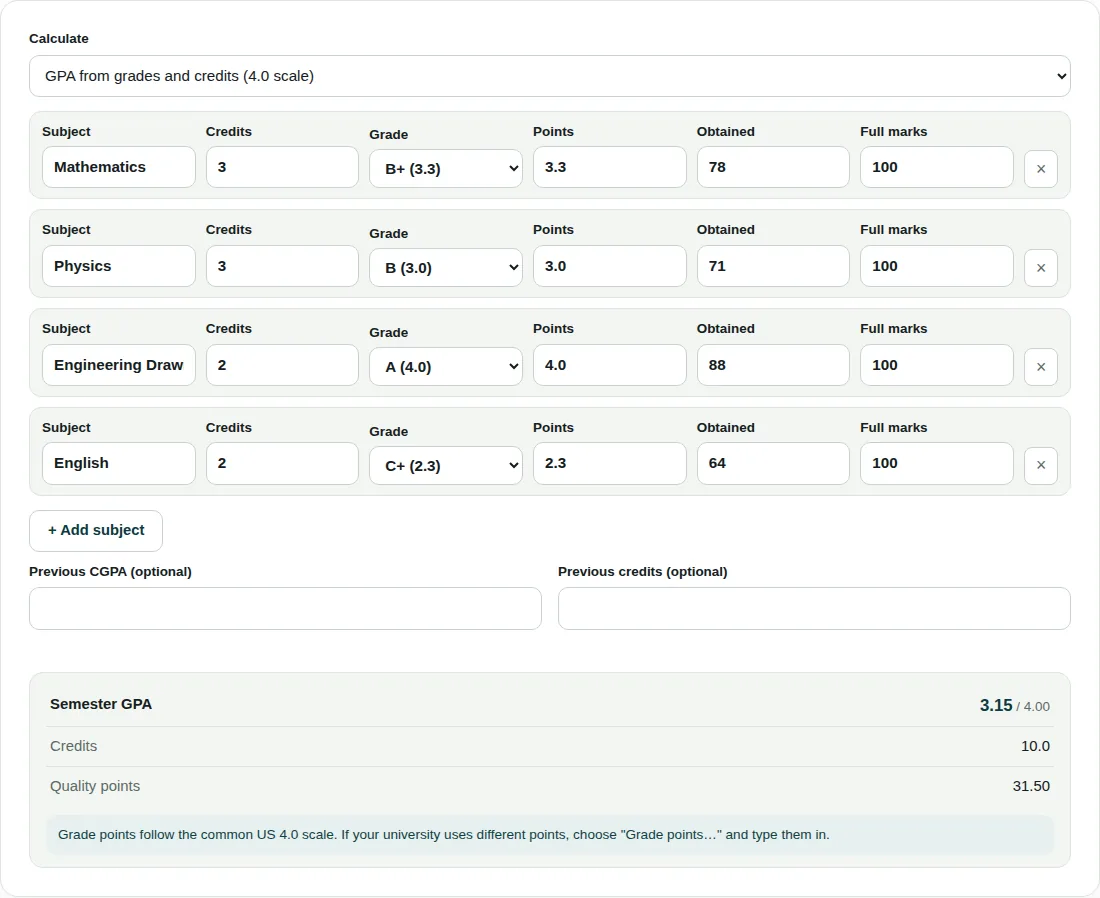
| Subject | Credits | Grade | Credits × points |
|---|---|---|---|
| Mathematics | 3 | B+ (3.3) | 9.90 |
| Physics | 3 | B (3.0) | 9.00 |
| Engineering Drawing | 2 | A (4.0) | 8.00 |
| English | 2 | C+ (2.3) | 4.60 |
| Total | 10 | 31.50 |
Semester GPA = 31.50 ÷ 10 = 3.15.
With a previous CGPA of 3.40 over 30 credits: (3.40 × 30 + 31.50) ÷ (30 + 10) = 133.50 ÷ 40 = 3.3375, shown as 3.34.
In percentage mode the same rows (78, 71, 88 and 64 out of 100) give 301 ÷ 400 × 100 = 75.25%.
Before you rely on the result
- If your university gives A+ more than 4.0 or uses a 10-point scale, choose Grade points… and type the points in.
- If any subject has more than 4 grade points, the result drops the / 4.00 label, because it is no longer on the 4.0 scale.
- Previous credits must be the credits behind your previous CGPA. Leave out pass/fail modules with no grade points.
- A number typed in Points overrides the grade in the dropdown.
Questions people ask
How do I calculate my GPA?
Multiply each subject’s credits by its grade points, add the results and divide by the total credits. In the example that is 31.50 ÷ 10 = 3.15. A subject with more credits moves the average further.
What is the difference between GPA and CGPA?
GPA usually covers one semester, while CGPA averages every semester so far. Combine them by credits: (previous CGPA × previous credits + quality points) ÷ total credits. Averaging semester GPAs without credits goes wrong when credit loads differ.
How do I convert my GPA to a percentage?
There is no single formula; your university or exam board sets the conversion, so use the one in your regulations. This calculator does not convert a GPA. If you have raw marks, Percentage from marks gives the overall percentage directly.
Related tools
- Images to PDF: Combine photos or scans into a single PDF.
- Merge PDF: Join several PDF files into one, in the order you choose.
- Compress PDF: Make a PDF smaller for email and upload limits.