
This JPG to PDF tool puts your images into one PDF, one image per page. Add photos of handwritten work, site pictures or diagrams, set the order and download a single file. PNG, WebP, GIF and BMP work too.
Pages can be A4, US Letter or the size of each image, with no margin, a small one or a large one. The PDF is built in your browser, so your images stay on your device.
Referencing & Report Cheat-Sheet
A free 4-page PDF: APA 7, Harvard and IEEE at a glance, plus a lab report checklist.
How to use it
- Click Choose images or drag them onto the box.
- Use ↑ and ↓ to set the page order, and × to drop an image.
- Choose a Page size (A4, US Letter or Same as each image) and a Margin (None, Small or Large).
- Click Create PDF, then Download to save
images.pdf.
How images are placed on the pages
pdf-lib builds the PDF and can embed only JPG and PNG. JPG files go in byte for byte, unless a phone photo stores its rotation in an EXIF tag; that photo is redrawn upright and saved as JPEG at quality 0.92. PNG files go in without loss, transparency included. WebP, GIF and BMP are first drawn on a white canvas and saved as JPEG at quality 0.92; a GIF gives one still frame.
Each image is scaled to fit inside the margins, keeping its proportions, and centred. On A4 (595.28 × 841.89 pt) or US Letter (612 × 792 pt) the page turns sideways when the image is wider than it is tall. Margins are 0, 20 or 40 pt (0, 7 or 14 mm). Same as each image sizes the page at 0.75 pt per pixel plus margins, which places the image at 96 dpi.
Example: three images on A4, small margin
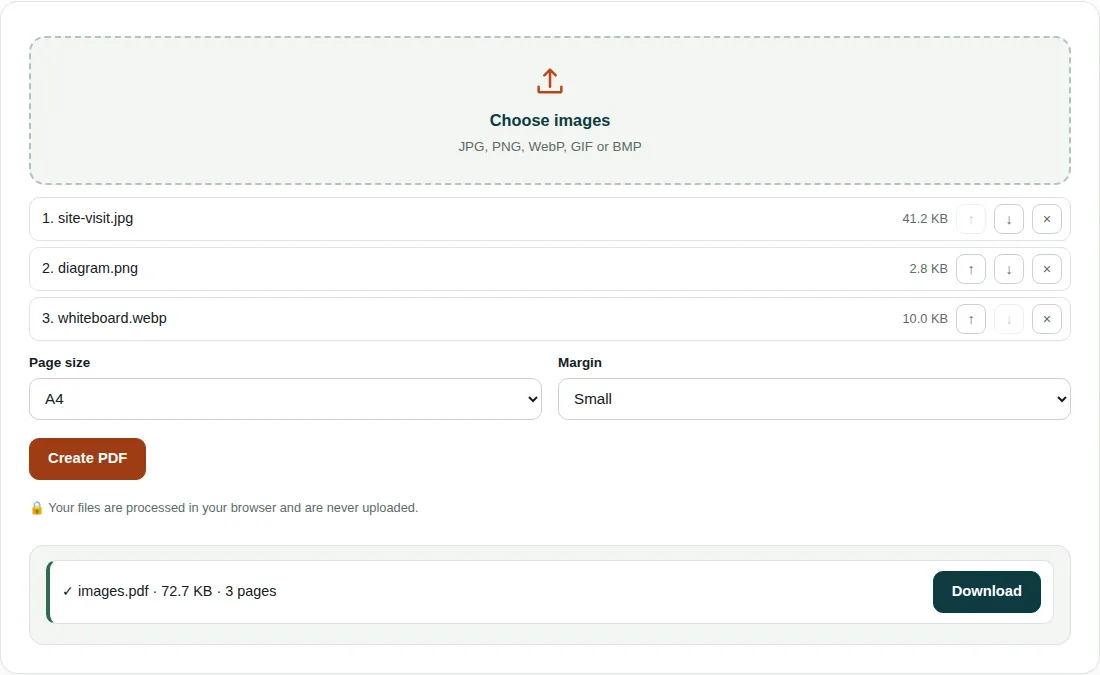
site-visit.jpg(1600 × 1000 px, 41.2 KB),diagram.png(800 × 600 px, 2.8 KB) andwhiteboard.webp(1600 × 1000 px, 10.0 KB) are all wider than tall, so each page is A4 turned sideways: 841.89 × 595.28 pt.- Space inside the 20 pt margins: 801.89 × 555.28 pt. Photo scale = min(801.89 ÷ 1600, 555.28 ÷ 1000) = 0.501, so it is placed at 801.9 × 501.2 pt (283 × 177 mm), about 144 dpi in print.
- The diagram is limited by height: 555.28 ÷ 600 = 0.925, giving 740.4 × 555.3 pt.
- The JPG goes in unchanged; the WebP is re-saved as a JPEG of 23.0 KB. The finished
images.pdfis 72.7 KB, 3 pages.
Tips for scans and photos
- Small images are enlarged to fill the page. A 400 × 300 px picture on A4 is stretched to about 261 mm wide, under 40 dpi, and looks soft.
- Phone photos are turned the way your gallery shows them, because the EXIF rotation tag is read before the page is made.
- For a smaller PDF, shrink large photos with Image Compressor first.
Questions people ask
How do I combine multiple JPGs into one PDF?
Add all the images with Choose images, put them in order with the arrow buttons and click Create PDF. Each image gets its own page, so ten photos give a 10-page PDF.
Does converting JPG to PDF reduce quality?
No. JPG files are placed in the PDF exactly as they are (only phone photos with a rotation tag are redrawn upright), and PNG files are stored without loss. Only WebP, GIF and BMP files are re-saved, as JPEG at quality 0.92.
Can I put two images on one page?
No, this tool puts one image on each page. To get two on a page, join them into one image first, or place them in a Word document and use Word to PDF.
Related tools
- Compress PDF: Make a PDF smaller for email and upload limits.
- Merge PDF: Join several PDF files into one, in the order you choose.
- Image Compressor: Shrink and resize photos without visible quality loss.