
This image compressor makes photos smaller for upload forms, email and slides. Set a quality, cap the longest side in pixels, and compress a batch of images in one go.
Photos are re-encoded by your browser, so they never leave your device. If a result comes out no smaller than the original in the same format, the tool gives you back the original instead.
Referencing & Report Cheat-Sheet
A free 4-page PDF: APA 7, Harvard and IEEE at a glance, plus a lab report checklist.
How to use it
- Click Choose images or drop them on the box.
- Pick an Output format: Same as original, JPG, PNG or WebP.
- Set Quality (10–100%, default 75) and Maximum width or height (blank = keep size), default 1920 px.
- Click Compress images. Download each file, or the ZIP when there are several.
How the compression works
The browser decodes each image and draws it on a canvas. If the longer side is over the maximum, it is scaled by maximum ÷ longer side; smaller images are never enlarged. The canvas is then saved at your quality, which applies to JPG and WebP. PNG is lossless, so only resizing makes a PNG smaller.
Same as original keeps PNG as PNG and WebP as WebP; GIF, BMP, SVG and everything else become JPG. Transparent areas turn white in a JPG, and an animated GIF keeps one frame.
A re-encoded image carries no metadata, so camera details and GPS location are removed.
Example: two site images at 75%
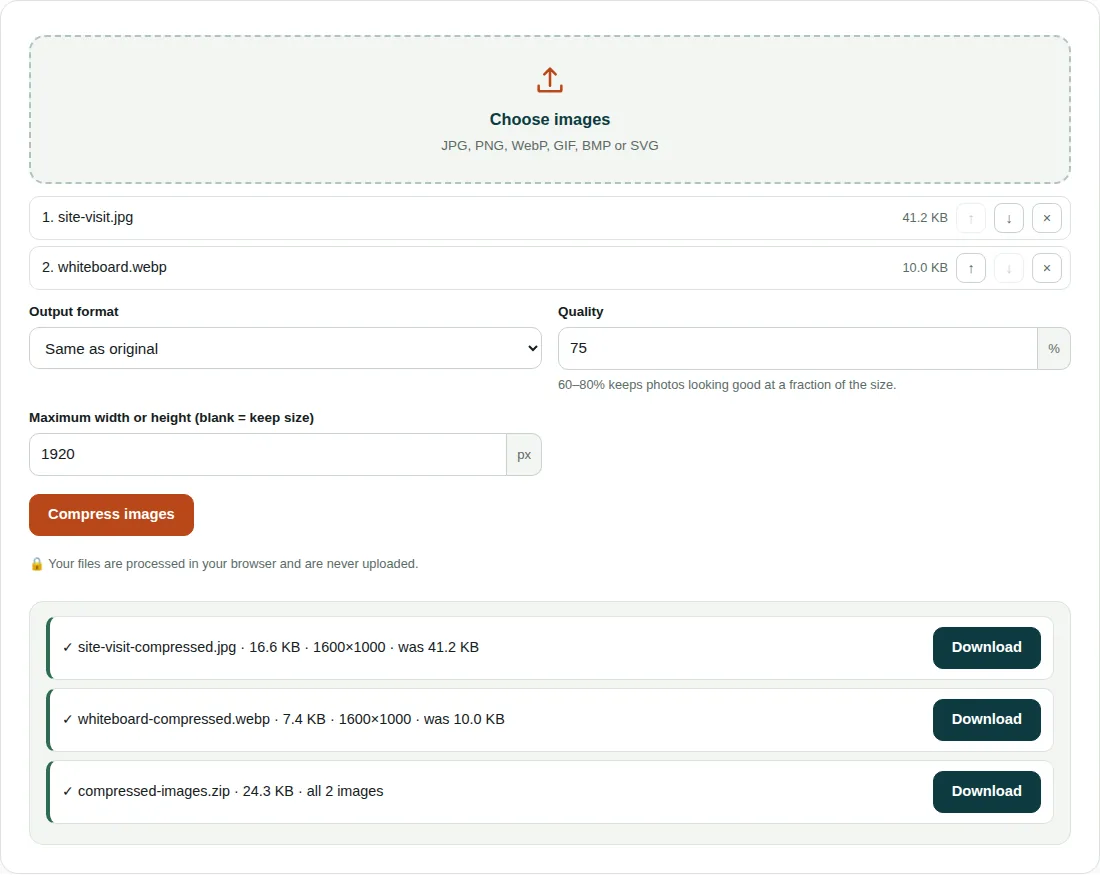
site-visit.jpg(41.2 KB) andwhiteboard.webp(10.0 KB) are both 1600 × 1000 px. Scale = min(1, 1920 ÷ 1600) = 1, so nothing is resized.- With Same as original, the JPG is saved as JPG and the WebP as WebP, both at quality 0.75.
- The photo drops to 16.6 KB: 1 − 16.6 ÷ 41.2 = 60% smaller. The WebP drops to 7.4 KB, 26% smaller.
- Both also come in
compressed-images.zip, 24.3 KB.
Getting good results
- Low settings show blocky patches first around sharp edges and in smooth areas such as sky. Zoom in on the result before you send it.
- A 1280 px maximum turns a 4000 × 3000 phone photo into 1280 × 960, about a tenth of the pixels.
- For PNG screenshots and diagrams, choose WebP output for a real saving.
- HEIC photos from iPhones open only in Safari, where this tool can save them as JPG. Elsewhere, set the iPhone camera to Most Compatible.
- If your browser cannot write WebP, you get a PNG and the result line says so.
Questions people ask
How do I reduce the size of a photo in KB?
Lower the Quality to 60–75% and set a maximum width or height such as 1280 px, then click Compress images. Resizing cuts the most because there are fewer pixels to store. There is no target-size box, so adjust and run again until the file fits.
Does compressing an image reduce its quality?
JPG and WebP compression throws away some detail, but at 60–80% it is hard to spot at normal viewing size. Each run starts from your original file, so repeated tries do not stack up losses.
Does the image compressor remove location data?
Yes, for every image it re-encodes: the camera model, date and GPS position are dropped. The exception is a file the tool could not shrink, which comes back as your original with its metadata.
Related tools
- Image Converter: Convert images between JPG, PNG and WebP.
- Images to PDF: Combine photos or scans into a single PDF.
- Compress PDF: Make a PDF smaller for email and upload limits.