
Convert MP4 to MP3 to keep the sound of a lecture video, a recorded talk or a clip for a presentation. MOV, M4A, WebM, WAV and OGG files work too, as long as your browser can decode their audio.
Pick a bitrate from 128 to 320 kbps and the MP3 is written on your device, with no upload. Files up to 1 GB are accepted, though recordings longer than about an hour need a lot of memory.
How to use it
- Click Choose a video or audio file or drop it on the box.
- Pick the MP3 quality: 128, 192 (recommended), 256 or 320 kbps.
- Set Channels to Stereo or Mono (one channel).
- Click Convert to MP3. The progress bar shows decoding, then encoding.
- Click Download. The result line gives the size and length.
How the audio is extracted
Your browser’s Web Audio decoder unpacks the audio track into raw samples at 44.1 kHz. Surround sound (5.1 and similar) is mixed down to stereo by the browser, so the centre channel with the dialogue is kept. The lamejs encoder, a JavaScript version of LAME, then writes a constant-bitrate MP3. Mono is made by averaging the left and right channels.
At a constant bitrate, size depends only on bitrate and length:
| MP3 quality | Per minute | Per hour |
|---|---|---|
| 128 kbps | 0.92 MB | 55 MB |
| 192 kbps | 1.37 MB | 82 MB |
| 256 kbps | 1.83 MB | 110 MB |
| 320 kbps | 2.29 MB | 137 MB |
So Mono does not halve the file: a 192 kbps mono MP3 is the same size as a stereo one. For a smaller file, lower the bitrate.
Example: an 8-second lecture clip
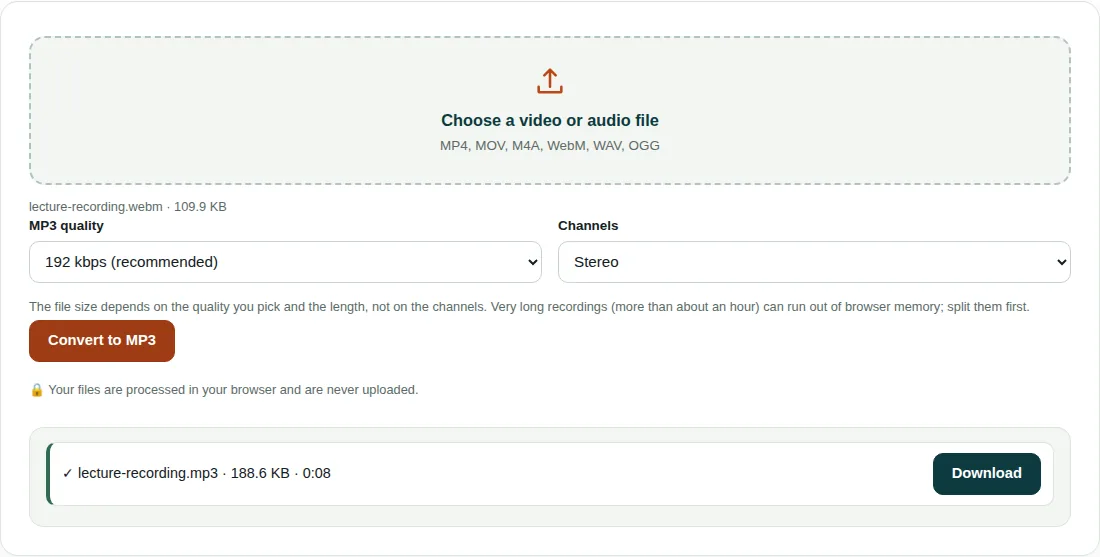
lecture-recording.webmis 109.9 KB and holds 8.008 s of mono Opus audio.- The browser decodes it at 44.1 kHz. The tool uses the smaller of the Channels setting and the channels in the file, so Stereo gives a mono MP3 here.
- Size at 192 kbps: 192,000 ÷ 8 × 8.008 = 192,192 bytes, plus encoder padding, gives 193,097 bytes = 188.6 KB.
- The length shows as 0:08. The MP3 is bigger than the source because the Opus track uses about 110 kbps; converting cannot add quality that was not recorded.
Codecs, memory and browsers
- MP4 audio is usually AAC. Desktop Chrome, Edge, Firefox and Safari decode it, but some Linux builds of Chromium and Firefox cannot.
- The whole file is decoded into memory as 32-bit samples first. An hour of 44.1 kHz stereo takes about 1.3 GB, so recordings over an hour can fail, especially on phones. Split long lectures first.
- The MP3 has no title or artist tags. Add them in your music app.
Questions people ask
How do I convert MP4 to MP3 without installing software?
Choose the MP4 here, pick a quality and click Convert to MP3. Your browser decodes the audio and a JavaScript encoder on the page writes the MP3, so nothing needs installing and the file is not uploaded.
What bitrate should I use for MP3?
192 kbps, the default, suits music and mixed content at 1.37 MB per minute. For lectures and speech, 128 kbps (0.92 MB per minute) is enough and saves a third of the space.
Why does it say the file has no audio track my browser can decode?
Either the video has no sound, or your browser cannot decode its audio codec. MP4 files usually carry AAC audio, which some Linux browser builds lack. Try desktop Chrome, Edge, Firefox or Safari.
Related tools
- Image Compressor: Shrink and resize photos without visible quality loss.
- Image Converter: Convert images between JPG, PNG and WebP.
- QR Code Generator: QR codes for links, Wi-Fi, email and phone numbers.